Setting up a walking pad under desk is not a shopping problem. It is an ergonomics problem that happens to involve a purchase. The pad is the easy part. The hard part is the two inches of clearance you did not measure, the remote you keep on the far corner of the desk, and the fact that nobody tells you a walking pad is loudest at the exact speed you want to walk.
I have three of these things in my house and a spreadsheet of decibel readings taken at ear height while walking, not while idle. Here is the setup I would hand to a normal remote worker with a standing desk and a bad back, in order, with the two pads I would actually put under a desk.
Why you should trust me
I spent nine years as a backend engineer sitting ten hours a day. At 31 my L5 disc herniated, and my physical therapist gave me a simple choice: move every hour or pay for it later. I rebuilt my home office around that sentence.
There are three walking pads in this house right now. One is under my desk, where it has been for two years. One is in the garage waiting on a return label because the belt tracked left no matter how many times I adjusted it. One lives in the guest room because my sister visits and refuses to sit still. I keep a tape measure for belt width, a step counter I actually look at, and a dated log of noise readings from the same spot in the same room.
I do not review running treadmills, and I will not tell you a walking pad is one. The safety profile is different, the belt is different, and the motor is different. This is a guide to the thing you stand on while you answer email, and I treat it like the medical device with a marketing problem that it is.
How I picked and how I tested
I test a pad the way I use one: at 2.0 mph for a full workday, with a phone call in the morning and a focus block in the afternoon.
Noise gets measured at ear height, standing, while the belt is moving at walking speed. That is the only number that matters. A manufacturer quoting decibels at idle is quoting a parked car. Every pad I have measured is meaningfully louder at 2.5 mph than at 1.0, and the ones that stay under a conversational level while walking are the ones that survive in a shared house.
Belt width is the second thing. Under-desk belts are narrow by design, and if you drift, you feel it in your hips by hour two. Deck height is the third, because it decides whether your standing desk still puts your elbows at 90 degrees once the pad is underneath it. After that I look at sustained versus peak horsepower, whether the auto-stop actually stops, whether the remote works without line of sight, and whether the app demands an account before it will change the speed. That last one is a dealbreaker for me and should be for you.
The two pads below are the ones I would hand a normal remote worker. One is built for incline walking, one is built for disappearing when you are done.
The four things to check before the pad arrives
Do this before you order, not after the box is in your hallway.
Your desk height. A walking pad under a fixed-height desk is a footrest with a motor. Measure the underside of your desk and subtract the pad deck height. You want at least two inches of cushion so you are not hitting the desk with your knees at 2 mph.
Your floor. Belt and motor vibration travels. A thin rug over hardwood is quieter than bare hardwood, and a rubber mat under the pad helps more than any product page will admit. Carpet is fine as long as it is not thick pile.
Your outlet. Cords run across walk paths. Route the power cable behind the desk leg and tape it down if you have to.
Your shoes. Barefoot or socks is fine on a walking pad at walking speeds. It is not fine on a running treadmill. This is one of the reasons the two categories should not be compared.
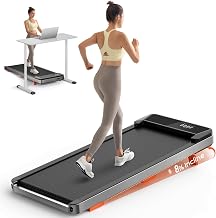
The incline pick: TREAFLOW Walking Pad with Incline, Under Desk Treadmills for Home
 Visit on Amazon →
Incline is the feature people skip and then regret. Flat walking for ninety minutes gets monotonous, and monotony is what kills the habit. A few degrees of incline changes your cadence, loads your calves and ankles a little more, and makes the same two miles feel like something you are doing rather than something happening to you.
The tradeoff is deck height. Any incline raises the front of the deck, which raises the effective standing surface, which is exactly the measurement people forget. If your standing desk is already near the top of its range, run the numbers before you commit. If it is not, this is the pad I would pick for someone who wants a real walking habit rather than a novelty.
Flaws but not dealbreakers: The higher deck means you need more clearance under the desk, and the belt is narrow like every pad in this class. If you tend to drift sideways while reading, watch the first week closely and keep your eyes off your phone.
This is for the remote worker who already stands part of the day and wants the walking part to feel like training.
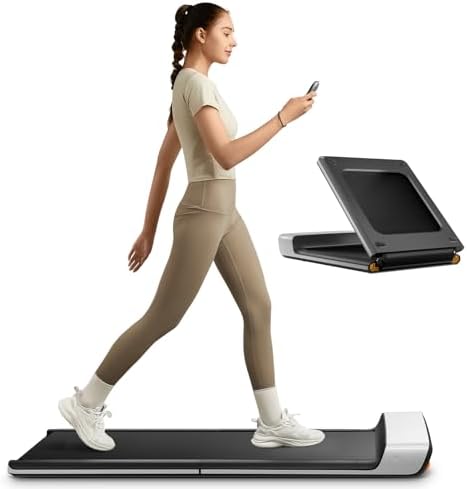
The compact pick: WalkingPad P1 Foldable Walking Pad Treadmill, Under Desk Compact Design
 Visit on Amazon →
If your apartment is small, or your desk shares a room with a bed, folding is not a gimmick. It is the difference between owning a walking pad and storing a walking pad under the bed eleven months a year. A folding deck is the single best answer to the fact that most buyers use these things less than they plan to.
The honest caveat is that a fold hinge is a moving part, and moving parts wear. On any folding pad, the hinge and the belt are the two things that decide how long it lasts, which is why I want a warranty that outlasts my enthusiasm. A company that trusts its motor backs it for years, not months.
Flaws but not dealbreakers: Folding pads tend to run a touch louder than fixed-deck pads because the deck has a joint in it. Keep it on a mat and it is manageable for calls.
This is for anyone in a small space, a rental, or a room where the pad has to disappear at 5 pm.
The actual setup workflow
Now the part you came for. None of this is complicated, but skipping a step is why pads end up on marketplace listings at 40 percent off with three miles on the belt.
Step one: clear the floor and measure. Move the chair, sweep the floor, and put your mat down. Measure the underside of the desk, measure the pad deck, and write both numbers down. If the gap is under two inches, fix the desk height before you fix anything else.
Step two: set the pad so the belt sits square to your desk. You want to walk facing your monitor, not at an angle. If the pad has to sit slightly off-axis to fit, you will feel it in your lower back within an hour.
Step three: put the remote where you can reach it without looking. This is the most underrated step in the whole guide. I touch my remote dozens of times a day. If it needs line of sight to the console, mount it somewhere it can see the console and still be reachable, or you will stop changing speeds, and then you will stop walking.
Step four: start at 1.0 mph for the first week. Not 2.0. Not 2.5. One mile per hour for twenty to thirty minutes at a time while you do low-stakes work. Your hips and ankles need a week to learn the belt.
Step five: move to 2.0 mph and hold there. Week two, go to 1.5. Week three, 2.0. Two miles per hour is the speed where walking stops interfering with typing and reading. It is also, on most pads, the speed where noise climbs noticeably. Test a call before you commit to a schedule.
Step six: build the hourly habit. Non-exercise activity thermogenesis is the whole point. Two miles per hour for sixty minutes is roughly two miles, which is several thousand steps, which is a lot of movement that costs you nothing but a slightly slower reply time. Two or three blocks a day beats one heroic session you dread.
Step seven: check belt tension and tracking monthly. With the pad off, look down the belt from the back. If it is drifting left or right, adjust per the manual before it wears the edge. If it slips under your foot, it is too loose.
Step eight: cool down and stow. Drop to 1.0 mph for the last two minutes. Then stop the belt completely, step off, and fold or roll the pad if you need the floor back. Never step off a moving belt.
The mistakes that make people quit
Starting at 3 mph on day one, then deciding walking pads hurt their knees. The belt did not hurt you. Your pace did.
Walking in thin socks on a belt that is not broken in, then blaming the deck for hot spots.
Trusting the decibel number on the box. Those are measured at idle, and idle is not a speed you will ever use.
Buying a pad for a fixed-height desk. You cannot walk and type while hunched, and you will quit within two weeks.
Wobble at 2.5 mph. If a pad rocks side to side at speed, it goes back. A wobbly deck at walking speed is a fall risk, and falls are the actual danger in this category.
Wheels that scrape the floor. Small thing, enormous annoyance, and usually fixable by adjusting how the pad sits on the mat.
Apps that require an account to change speed. If the pad will not move without a login, the remote had better work without line of sight.
What this actually gets you
At 2 mph, an hour of walking is about two miles, which is several thousand steps, which is more movement than most desk workers get in a full day. Spread over a work week, that is the difference between a body that sits and a body that moves, and it costs you almost no focus once the habit forms.
What it will not do is replace strength training, fix a herniated disc, or make you fit on its own. No walking pad cures anything. It is a tool for not sitting still, and it works best when it is the smallest, easiest decision in your day.
What this article is not
It is not a running guide. Running on a walking pad is a different activity with a different safety profile, and the belts and motors in this class are not built for it.
It is not a medical claim. I am not your physical therapist. Mine told me to move every hour, and that advice is free, and you should get your own version of it.
It is not a replacement for a desk that adjusts. If your desk is fixed, buy the desk first. The pad is the second purchase, always.
The bottom line
Measure the clearance, set the pad square, put the remote in reach, and start at 1.0 mph. Do that and the pad becomes part of the room instead of a thing you trip over.
Pick the TREAFLOW if you want incline and you have the desk height for it. Pick the WalkingPad P1 if the pad has to fold away and vanish. Either way, the setup is what decides whether you are still walking on it in March.
Check current Amazon price on both before you commit, and measure twice.