Most people buy a walking pad with incline, slide it under a desk that was never set up for movement, and quit inside two weeks. The pad is usually fine. The setup is what fails. The belt sits too far back, the desk is two inches too low, the remote is on the floor somewhere, and by day four their calves are barking and the pad is under the bed with the resistance bands.
I know that sequence because I lived it. I spent nine years as a backend engineer sitting ten hours a day, and my L5 disc herniated when I was 31. My physical therapist gave me a simple deal: move every hour or pay for it later. I rebuilt my home office in Austin around that rule, and I have been reviewing walking pads and standing desk gear ever since.
This is the setup guide I wish I had. Not the unboxing, the actual placement, height, cadence, and habit work that decides whether the thing survives past week three.
Why you should trust me
I own three walking pads. I keep a step counter on my wrist, a tape measure on the desk, and a spreadsheet of decibel readings taken at my own ear height while walking, because manufacturer numbers are quoted at idle and idle is not a walk.
I am not going to hand you a decibel number for a pad I have not had on my floor. What I will do is tell you exactly what to measure, what number to expect, and which specs tell you more about build quality than the marketing copy does. I also do not review a pad without thinking about the desk it goes under, because the pair is the system. A walking pad under a fixed-height desk is a very expensive footrest.
What a walking pad can and cannot do
Let me set the boundary early. A walking pad is a movement tool, not a cure. It will not fix your back, and I am not going to pretend otherwise. What it does is make the hourly movement your body wants cheap enough that you actually do it. That is the entire value proposition.
Two more boundaries. First, walking pads are not treadmills. The deck is short, the belt is narrow, and the frame is built for a 2 mph stride, not a 6 mph run. If a listing says jogging or running, treat that as marketing. Run on a walking pad at speed and you will eventually step off the back of a belt that stops two feet behind you. Second, incline on a walking pad is a calf and ankle tool, not a cardio cheat code. A 3% to 5% grade for 30 minutes is plenty. You are not training for a hill race at your standing desk.
Before you buy: the specs that decide everything
Ignore the horsepower sticker for a second and look at these five things.
Belt width. Sixteen inches is the floor for comfortable walking. Under that, your stride narrows, your hips tighten, and you start shuffling. If you are over six feet tall, look for wider.
Peak versus sustained HP. Peak is a spike that lasts seconds. Sustained is what the motor can hold for an hour. A pad rated at 2.25 peak HP might be a 1 HP motor in practice. Sustained is the number that matters for a workday.
Deck height. Lower is more stable and easier to step onto. Anything over about 6 inches and you are climbing into position, which is a small friction point that becomes a big one on a tired Monday.
Noise at walking speed. A pad that hums quietly at idle can whine at 2.5 mph. This is the single most common spec lie in the category, and it is why I measure at ear height while the belt is moving, not from the couch while the pad sits still.
The remote. The remote is the most important feature nobody tests. You will use it 30 to 40 times a day. If it needs line of sight, if the battery door falls off, if it lives on the floor, the pad is a hassle. Radio remotes beat infrared every time.
Add auto-stop to the list. A pad that cuts the belt when it senses nothing on the deck is a safety feature you want, and you should test it the day it arrives.
The two pads in this guide
Both of these are under-desk walking pads with incline, which is the configuration I recommend for desk work. Incline lets you shift load off your lower back and onto your calves on days when sitting has already annoyed your spine. Neither is a running machine, and neither should be used as one.
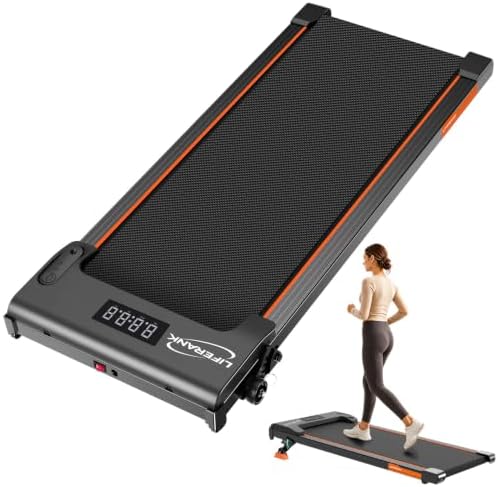
Budget pick: Walking Pad Treadmill for Home Office, Portable Under Desk Treadmill with Incline, Mini Compact Walking Jogging Running Exercise Machine with Remote Control and LED Display
 Visit on Amazon →
This is the entry point, and the compact frame is the reason it works for tight setups. The LED display and remote control are the two features I would actually use daily: the display gives you speed and time at a glance without pulling out a phone, and the remote means you are not bending down to a console under your desk mid-call.
The incline is the differentiator at this price. It gives you a way to change the load on your legs without changing your speed, which matters more than most buyers realize. Walking flat at 2 mph for three hours is a different physical demand than walking the same speed with a grade, and switching between the two is how you keep going on days when your back is unhappy.
Read the listing name carefully, though. It says jogging and running. Do not. This class of pad is built for walking, and the deck length and belt width reflect that. Use it for what it is and it will last.
Flaws but not dealbreakers: Compact frames trade stability for footprint. If you are tall or have a long stride, check the belt width before you commit, because a narrow belt on a light frame is where the wobble complaints come from.
Anyone in an apartment or a small home office who wants to test the walking-desk habit without committing to a big footprint should start here.
Our pick: TREAFLOW Walking Pad with Incline, Under Desk Treadmills for Home
 Visit on Amazon →
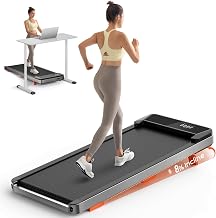
If your budget has a little room, this is the one I would point most desk workers to first. The incline is central to the design rather than an add-on, which is exactly the configuration I want for a workday pad: a walking deck you can flatten for long focus blocks and tilt when you want your calves doing more of the work than your lower back.
TREAFLOW built this for home use, and home use is a specific thing. It means the pad lives in a room with other people in it, which puts noise and footprint at the top of the priority list. It also means the pad gets moved, so check the transport wheels and the weight before you decide where it lives. If your office is carpeted, that matters too, because a heavy pad on thick pile can feel soft and unstable at speed.
Same caveat as above, and it is the important one: walking only. An incline plus speed on a short deck is how people fall.
Flaws but not dealbreakers: It costs more than the compact option, and incline mechanisms add a part that can wear. Buy it for the walking, not for the grade, and you will be happy with it.
Anyone who has already proven they will actually use a pad, and wants the incline built in properly, should look here first.
Setting it up: the step by step
Now the part that decides whether this survives past week three.
Step one: Place the pad, then the chair, then the desk. Do not shove the pad into whatever gap is left. Give yourself at least three feet of clear space behind the belt so you can step off backward without thinking about it. Nothing goes behind you. No boxes, no file cabinet, no dog bed.
Step two: Set desk height with the pad in place. This is the step everyone skips. Stand on the pad, not next to it, then set your desk so your elbows sit at roughly 90 degrees and your wrists are flat, not bent up or down. If you have incline engaged, the deck is higher, so set the height with the incline on and accept that you will be slightly lower when you flatten it. A two-inch error here is the difference between a comfortable hour and a sore neck by Thursday.
Step three: Start slower than feels reasonable. Week one is 0.5 to 1 mph. Not 2, not 2.5. You are teaching your hips and ankles a new pattern while your hands do keyboard work, and that is a coordination task before it is a fitness task.
Step four: Find your working cadence. For typing and calls, 1.8 to 2 mph is the sweet spot for most people. Faster than that and your typing accuracy drops and you start gripping the desk edge with your fingertips, which is the tell that you have gone too fast. Short steps, relaxed arms, no leaning forward into the screen.
Step five: Fix the remote before day one. Put it on the desk edge, within reach without looking down, or velcro it to the frame where your hand naturally rests. If it is on the floor, you will stop using it, and if you stop changing speed, you will stop walking.
Step six: Test auto-stop and the safety clip. Step off the belt while it is moving and confirm it stops. Do this once, deliberately, while you are calm, so you know what it feels like.
Step seven: Decide on shoes. For barefoot walking, keep speeds low and use the flat setting until your feet adapt, because incline plus bare feet is a lot of load on the arch and Achilles. If you wear shoes, pick something flat and firm. Thick cushioned running shoes on a thin deck feel unstable and make the belt feel narrower than it is.
Step eight: Build the hourly habit. Ten minutes an hour beats one heroic 90-minute session. Stack it on something you already do: every time you refill your water, walk for ten minutes before you sit back down.
Desk pairing: the part nobody plans for
A walking pad without an adjustable desk is a footrest. Say it out loud before you buy.
Your standing desk height needs to work at 0 mph and at 2 mph, and those are close but not identical, because walking changes your posture slightly. Set it for walking and it will be fine for standing. Set it for standing and it will be two inches off for walking.
The other pairing question is floor. Hard floors transmit motor noise into the room below. If you have downstairs neighbors, a dense mat under the pad does more for the relationship than any spec on the box.
What this costs
The pad is the cheap part. The desk is the expensive part, and the mat and the habit cost nothing but attention.
The math that actually matters is not the sticker. It is how many days a week you walk. A pad used four days a week for an hour is a completely different purchase than a pad used twice and stored under the bed. Before you spend anything, run this test: stand at your desk for 30 minutes without walking. If standing alone is already a chore you avoid, a walking pad will not save you. If standing feels good and you just want your legs to have something to do, you are the right buyer.
The mistakes that kill the habit
Speed too high in week one. Remote out of reach. Desk height set while standing on the floor instead of the belt. No clear step-off space behind the pad. Running on a machine built for walking. And the big one: buying the pad before checking that your desk actually adjusts low enough to type at when you are standing.
Fix those six things and the pad becomes furniture you use instead of furniture you store.
Bottom line
Set the pad up like a workstation, not like a gadget. Clear space behind you, desk height measured from the belt, remote where your hand already is, speed low enough that you forget you are walking. The incline is a tool for changing load, not a challenge. Start flat, add grade on days your back is stiff, and keep the speed where you can still type a sentence without looking down.
Do that, and the pad stops being a purchase you feel guilty about and starts being the reason you moved 6,000 extra steps on a Tuesday you would otherwise have spent entirely in a chair.